OSC
In Myelin Director, various actions and properties can be controlled via OSC. Myelin Director can also be used to trigger other software and hardware through OSC.
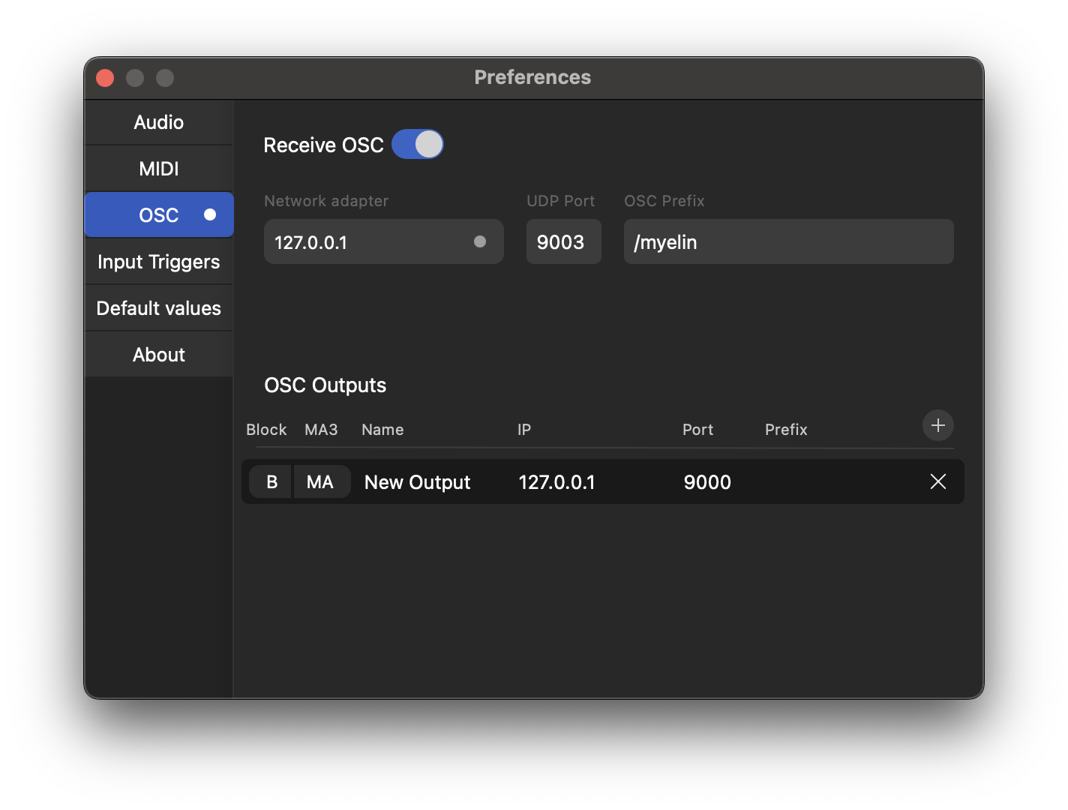
OSC settings can be found in the OSC tab of the app's Preferences.
In order to enable OSC input, 'Receive OSC' has to be enabled, and a network adapter and port can be chosen. By default, Myelin Director uses the '/Myelin' prefix, meaning that all commands sent to Myelin should have that prefix in front of the address. This prefix can be freely changed or removed.
The tables below indicate the available commands.
Transport Controls
| OSC Address |
Argument Type |
Description |
/play |
(none) |
Start or resume playback |
/pause |
(none) |
Pause playback |
/stop |
(none) |
Stop playback |
/back |
(none) |
Go back |
/forward |
int / float |
Forward seconds |
/rewind |
int / float |
Rewind seconds |
/move |
int / float |
Move seconds |
Zoom & View Control
| OSC Address |
Argument Type |
Description |
/auto_zoom_set |
(none) |
Auto-zoom timeline to fit the current set |
/auto_zoom_content |
(none) |
Auto-zoom timeline to fit all content |
/zoom_in_tracks |
(none) |
Zoom in on all track strips |
/zoom_out_tracks |
(none) |
Zoom out on all track strips |
Editing operations
| OSC Address |
Argument Type |
Description |
/quantize |
(none) |
Quantize the current multi-selection |
/split |
(none) |
Split selected items at the cursor |
/split_all |
(none) |
Split all items at the cursor |
/undo |
(none) |
Undo last action |
/redo |
(none) |
Redo last undone action |
/cut |
(none) |
Cut selected items to clipboard |
/copy |
(none) |
Copy selected items to clipboard |
/paste |
(none) |
Paste clipboard content at cursor |
/duplicate |
(none) |
Duplicate selected items |
/select_all |
(none) |
Select all content |
/insert_at_cursor |
(none) |
Insert content at the current cursor position |
Region Commands
| OSC Address |
Argument Type |
Description |
/region |
string |
Jump to region by name (current set) |
/region/play |
string |
Jump to region by name and play |
/region |
string, string |
Jump to region by name in set |
/region/play |
string, string |
Jump to region in set and play |
/region/next |
(none) |
Jump to next region |
/region/previous |
(none) |
Jump to previous region |
/region/next |
int |
Jump forward by N regions |
/region/previous |
int |
Jump backward by N regions |
/region/next/play |
int |
Jump forward by N regions and play |
/region/previous/play |
int |
Jump backward by N regions and play |
Set Commands
| OSC Address |
Argument Type |
Description |
/set |
string |
Jump to set by name |
/set/play |
string |
Jump to set by name and play |
/set/next |
(none) |
Jump to next set |
/set/previous |
(none) |
Jump to previous set |
/set/next/play |
(none) |
Jump to next set and play |
/set/previous/play |
(none) |
Jump to previous set and play |
Track Controls
| OSC Address |
Argument Type |
Description |
/track/block |
string |
Block a track by name |
/track/unblock |
string |
Unblock a track by name |
/track/toggle_block |
string |
Toggle block of a track by name |
/track/block/all |
(none) |
Block all tracks |
/track/unblock/all |
(none) |
Unblock all tracks |
Deck Selection (TCNet)
| OSC Address |
Argument Type |
Description |
/deck |
int (1–4) |
Select deck number |
Sync Controls
| OSC Address |
Argument Type |
Description |
/sync/enable |
(none) |
Enable external timecode sync |
/sync/disable |
(none) |
Disable timecode sync |
Enable / Disable Recording
| OSC Address |
Argument Type |
Description |
/record/online/enable |
(none) |
Enable online input triggers |
/record/online/disable |
(none) |
Disable online input triggers |
/record/offline/enable |
(none) |
Enable offline input triggers |
/record/offline/disable |
(none) |
Disable offline input triggers |
| OSC Address |
Argument Type |
Description |
/record/press |
string |
Trigger press on track |
/record/release |
string |
Trigger release on track |
Client Session Control
| OSC Address |
Argument Type |
Description |
/client/blind |
(none) |
Enable blind session |
/client/unblind |
(none) |
Disable blind session |
Video Switcher
| OSC Address |
Argument Type |
Description |
/videoswitcher/block |
string / int |
Block camera by name or ID |
/videoswitcher/unblock |
string / int |
Unblock camera |
/videoswitcher/toggle_block |
string / int |
Toggle camera block state |
OSC Output
Myelin can output OSC via OSC triggers. More information on how to use those, please check out the Triggers docs page
OSC triggers use predefined OSC output presets. These can be configured in the OSC settings part of the OSC tab of the app's Preferences.
By clicking the '+' button, we can add an OSC output preset.
We can set the name, destination IP-address and port, and optionally a prefix, that will be put in front of the address defined in the individual trigger.
We can also block an OSC output, by enabling the block (B) button. Enabling the MA3 (MA) button, we select this OSC output to be used for sending grandMA3 triggers over OSC.